
 Adrian Vale
Kling AI Standard is the first paid plan to check for occasional Kling clips. Its US-dollar web listing showed a $10 monthly list price and 660 monthly credits on November 6, 2026. The page also displayed a first-month offer and a separate renewal price. For a budget you can repeat next month, use the renewal total shown at checkout.
| Kling AI web plan | Monthly list price shown | Monthly credits shown | When to look at it |
|---|---|---|---|
| Basic | $0 | No monthly allotment listed | Explore the app and check which generation options you can access |
| Standard | $10 | 660 | A few shots with the native Kling workflow |
| Pro | $37 | 3,000 | A project that needs more takes per shot |
| Premier | $207 | 18,000 in the selected configuration | Higher-volume production with a measured credit budget |
| Ultra+ | $619 | 57,000 | Sustained production that can use the larger allocation |
These are the list prices and selected allocations we saw on the Kling AI web membership page. Offers, currency and renewal totals can vary. Premier had multiple credit configurations. For iPhone or iPad billing, see Kling AI's App Store listing.
How many clips do 660 Kling credits buy?
Use the credit amount shown for your exact shot. The model, duration and output settings can change that amount. If your configuration shows 60 credits per attempt, the Standard plan's 660 monthly credits cover 11 attempts. If you usually need three takes per keeper, budget for three finished clips with two attempts left. The 60-credit figure is an example to show the math.
For a client project, pick a representative shot first. Count how many attempts it takes to get a clip you would actually deliver, then multiply that credit cost by the number of shots in the brief. That gives you a better subscription budget than dividing the plan by the length of a finished video.
Kling AI vs. Runway vs. Tinulo
| Tool | Where it fits | How to compare the cost |
|---|---|---|
| Kling AI | You want native Kling tools such as Motion Control, multi-keyframe generation, or reference-driven shots | Check the cost on the actual configuration, then multiply by your expected takes |
| Runway | You want to direct a custom shot from an image or text prompt using Gen-4.5 | Standard lists 625 monthly credits. A five-second Gen-4.5 attempt uses 60, which allows 10 full attempts with 25 credits left |
| Tinulo | You have photos and want a short clip in a style you can preview first | Pick a template and use the composer’s quote for the job you want to run |
Runway publishes its figures in the plan table and Gen-4.5 guide. Each platform uses its own credit unit. Compare the cost to get one usable clip at the settings you need.
What the photo-to-video workflow looks like
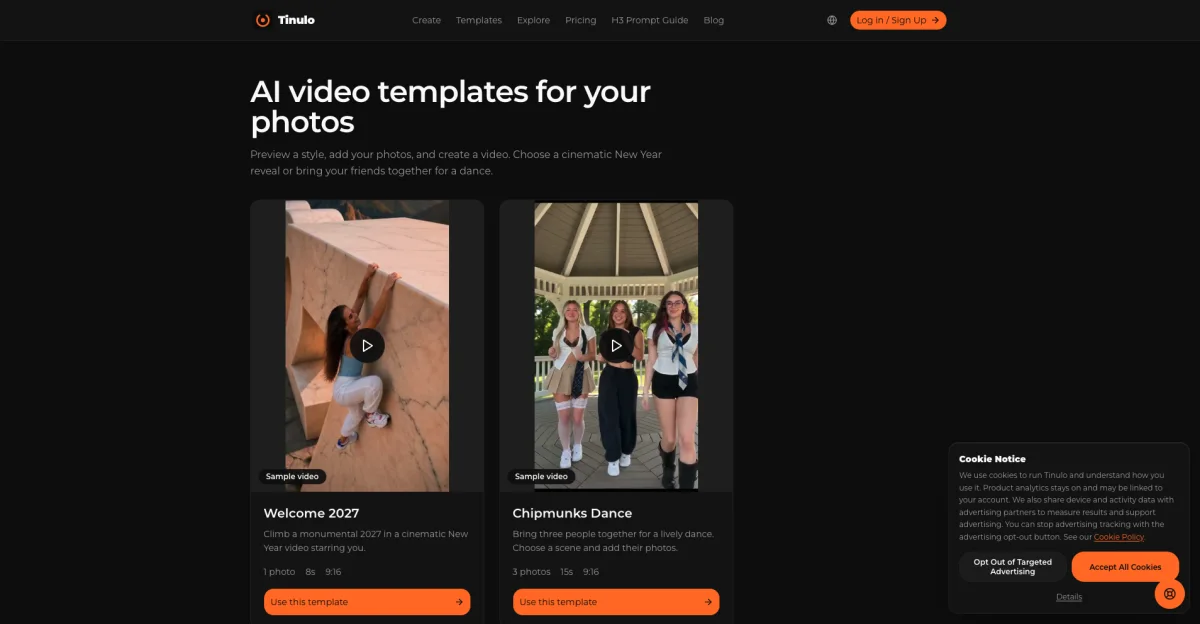
We publish Tinulo. The screenshot shows our live template gallery, where you can preview a style before opening the creator. Start with Fancy Cafe if you want to see what a café scene looks like before adding your own photos. This comparison uses published pricing and workflow documentation. The screenshot shows the Tinulo interface, and the linked Fancy Cafe clip shows one example output.
Pick a template and create a video from your photos